If you’ve been building WordPress sites for a while, you’ve probably heard the buzz about the Kadence Theme. It’s often praised as fast, flexible, and beginner-friendly — the kind of theme that promises you can design beautiful websites without touching a single line of code.
But let’s be honest. Every theme claims that.
So, I decided to put Kadence to the test — not just by reading feature lists, but by actually building a real website with it, running speed tests, and comparing it with popular themes like Astra and GeneratePress.
Here’s what I wanted to know:
- How easy is Kadence to customize (really)?
- Does it live up to its “lightweight and fast” reputation?
- Is the free version powerful enough, or do you need to upgrade to Pro?
In this hands-on review, I’ll walk you through everything — from setup to customization, performance results, pricing, and my honest verdict on whether Kadence is worth your time (and money).
By the end, you’ll have a clear answer to the big question:
Is Kadence the best WordPress theme for your blog or business — or just another overhyped option?
What Is Kadence Theme (and Why Everyone’s Talking About It)
If you’ve been around the WordPress block, you already know the struggle — most themes force you into one of two traps:
either they’re too barebones to build anything beautiful, or they’re so bloated that your site crawls slower than a dial-up connection.
That’s where Kadence Theme comes in.
Developed by Kadence WP (the same folks behind Kadence Blocks and other handy plugins), this theme aims to strike the perfect balance — lightweight performance meets deep customization.
In simple terms:
Kadence is a modern, block-based WordPress theme that lets you design stunning, fast-loading websites without touching code.
It’s built to work hand-in-hand with the WordPress block editor (Gutenberg), meaning you can drag, drop, and visually tweak almost everything — from headers and footers to color palettes, fonts, and layout widths.
The Core Idea Behind Kadence
Unlike traditional multipurpose themes that try to be everything for everyone, Kadence takes a modular approach. You only load the features you need — keeping your site fast and bloat-free.
That’s why developers love it, and beginners swear by it.
And thanks to its starter templates (ready-made site designs), even someone who’s never customized a WordPress theme before can launch a clean, professional-looking site in under an hour.
Here’s what makes Kadence stand out from other free themes on the market:
Kadence comes in two flavors:
Kadence isn’t just another “lightweight theme.” It’s part of a new generation of block-based WordPress themes designed to help you build faster, smarter, and cleaner — without sacrificing creative control.
Key Features (Hands-On Overview)
Kadence doesn’t just talk about flexibility — it actually delivers it.
After spending hours setting it up on a test site, here’s what stood out most during my hands-on experience.
The Free Version — Surprisingly Generous
Let’s start with the basics: the free Kadence Theme.
Most “free” WordPress themes act like demo versions of their premium siblings — half the options are locked behind paywalls. Kadence isn’t like that.
Even the free version gives you powerful design control over your entire site. Here’s what you get out of the box:
Global Design Control
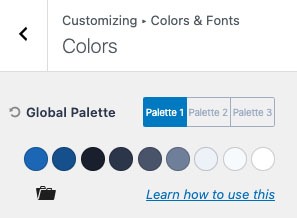
You can set your site-wide color palette and typography in one place. Want to switch from Poppins to Inter or tweak your brand color? It’s all done instantly — no need to edit individual elements.
It feels a bit like having a mini design system built right into your theme.
Header & Footer Builder
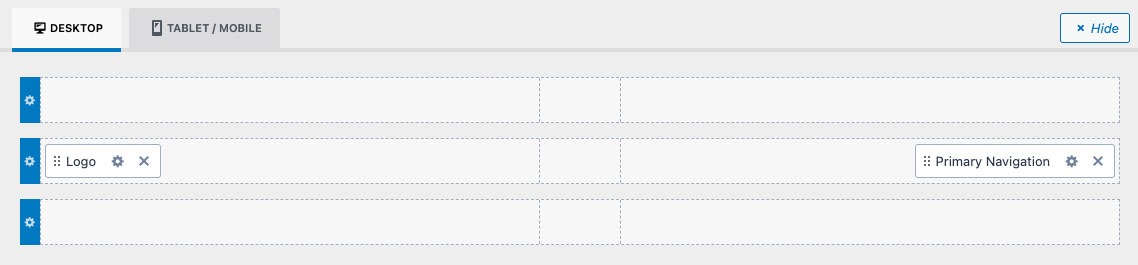
This one blew me away for a free theme.
Kadence gives you a drag-and-drop header and footer builder, where you can add logos, menus, buttons, search icons, or even social links — and rearrange them visually.
No code, no child theme edits. Just drag, drop, done.
Responsive Controls
You can preview and adjust everything for desktop, tablet, and mobile directly in the Customizer.
No more guessing if your mobile layout will break.
Starter Templates
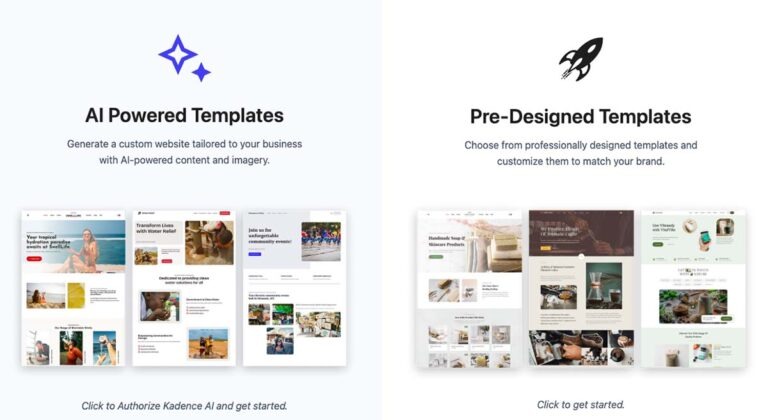
Kadence Starter Templates plugin adds pre-designed site layouts for blogs, agencies, shops, and more. Import one in a click — then just replace the content.
Unlike many “demo importers,” these templates are clean and fast.
Performance-Ready by Default
Even before optimization, Kadence pages load quickly.
The codebase is lean, and it doesn’t pile on unnecessary scripts or styles.
That means faster Core Web Vitals — something Google loves.
Kadence Pro — Unlocking the Power Tools
If the free version feels like a solid car, Kadence Pro is what happens when you add turbo mode.
Here’s what you unlock with the premium upgrade:
Advanced Header Addons
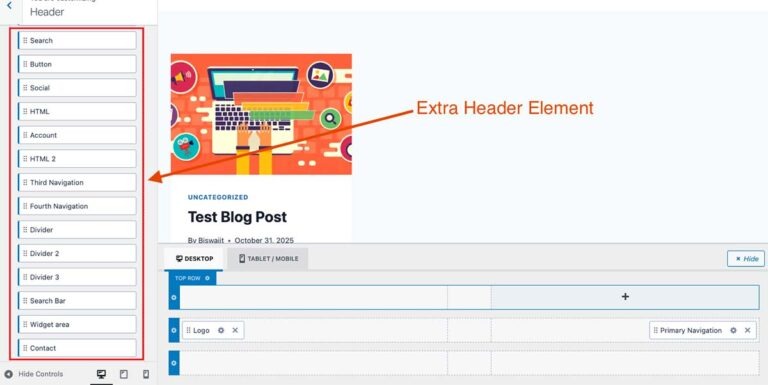
You can add extra elements (like dividers, contact info, search bar, or secondary navigation) anywhere in the header or footer.
Conditional headers let you show different headers on different pages — for instance, a simplified version for landing pages.
Hooked Elements (Dynamic Sections)
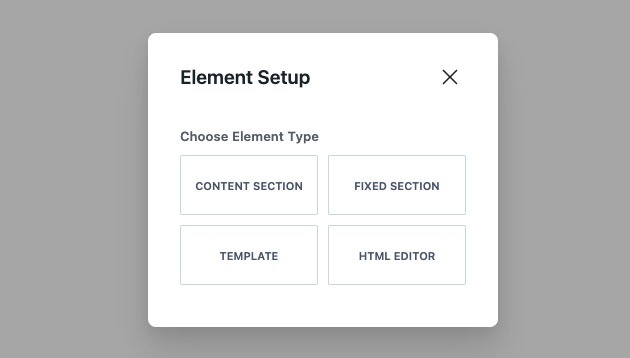
This is one of Kadence Pro’s secret weapons.
It lets you create custom content blocks — banners, CTAs, notices — and display them dynamically across your site (above content, after post, before footer, etc.).
Perfect for adding affiliate CTAs, opt-in forms, or special offers site-wide — no plugin bloat required.
WooCommerce Enhancements
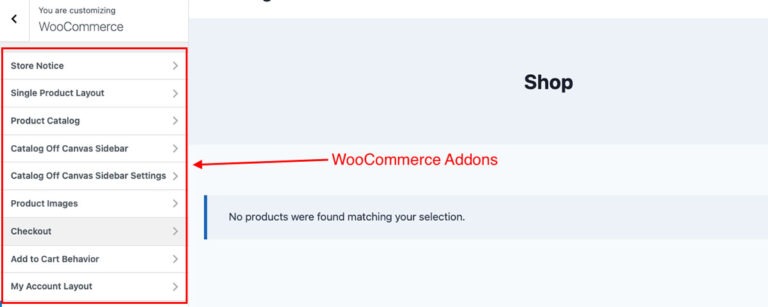
Kadence Pro adds deep WooCommerce customization: product galleries, cart layouts, sticky add-to-cart bars, and more.
For anyone building an online store, this is a big deal.
Mega Menu Builder
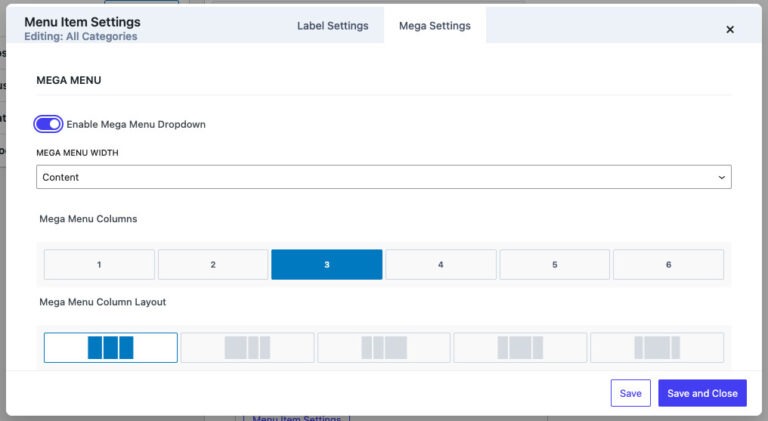
Want advanced navigation? The mega menu builder lets you add columns, icons, and even custom blocks inside your dropdown menus — all visually editable.
Header/Footer Scripts & Conditional Display
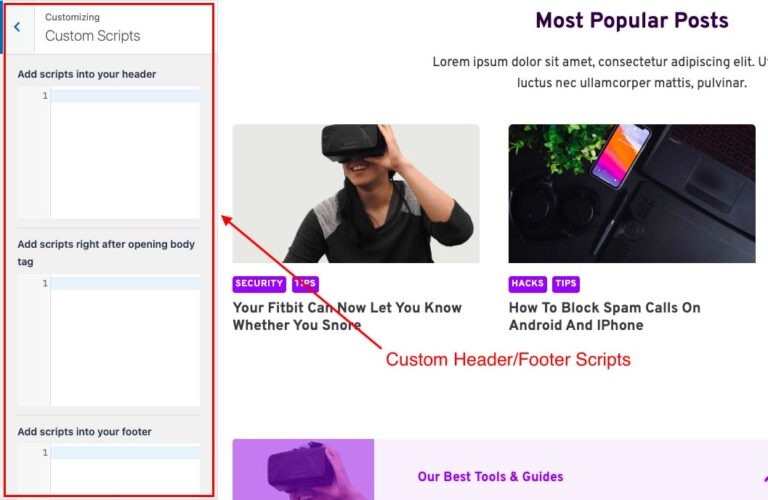
Pro gives you full control over visibility — show or hide sections based on user roles, device type, or page type.
It’s the kind of control that developers crave but beginners can still use without code.
Performance & Speed (Real-World Test
I tested Kadence on a fresh WordPress install with a standard design hosted on LiteSpeed server (with no caching plugin).
Here are the results from GTmetrix and Google PageSpeed Insights:
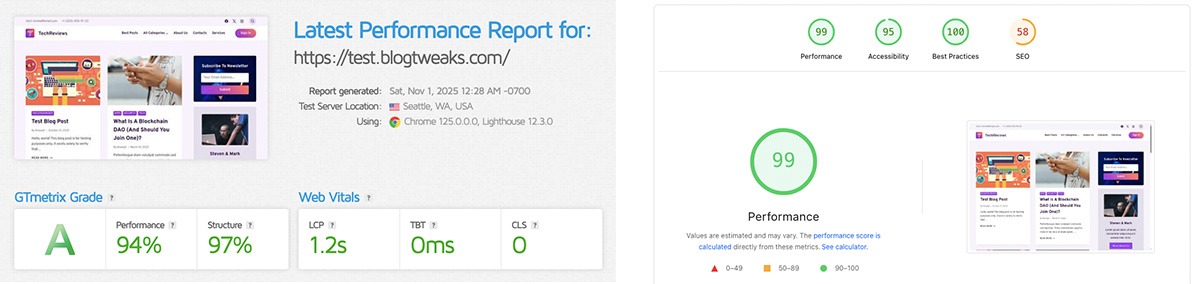
That’s seriously good — especially considering I hadn’t added any extra optimization yet.
Kadence loads minimal JavaScript and CSS files, which keeps the site blazing fast even on shared hosting.
In short: Kadence is one of the fastest multipurpose themes I’ve tested — right up there with GeneratePress and Astra.
Customization & Design Flexibility
Kadence shines brightest here.
This combination practically replaces the need for a separate page builder like Elementor for most users.
Compatibility & Ecosystem
Kadence plays nicely with almost every major plugin:
It’s also regularly updated, well-documented, and has an active community on Facebook — which helps when you get stuck.
Real-World Impression
After testing multiple free and premium WordPress themes over the years, Kadence feels refreshingly modern.
It doesn’t fight you during customization. It feels light, stable, and designed for actual creators — not developers tinkering in code editors all day.
If you’re building a blog, portfolio, or WooCommerce store, Kadence gives you enough freedom to design without frustration — and that’s a rare find.
Kadence isn’t about “more options” — it’s about smarter control.
Everything works intuitively, loads fast, and looks good out of the box.
My Hands-On Test: Real-World Experience
Whenever I review a WordPress theme, I don’t just scroll through the settings and call it a day.
I install it on a fresh WordPress site, import a starter template, and see how it feels to actually build with it — the real-world test that separates hype from reality.
So that’s exactly what I did with Kadence Theme.
Test Setup
To keep things fair, here’s what I used:
No developer tools, no custom CSS — just the default options any beginner could use.
Installation & Setup — Smooth and Beginner-Friendly
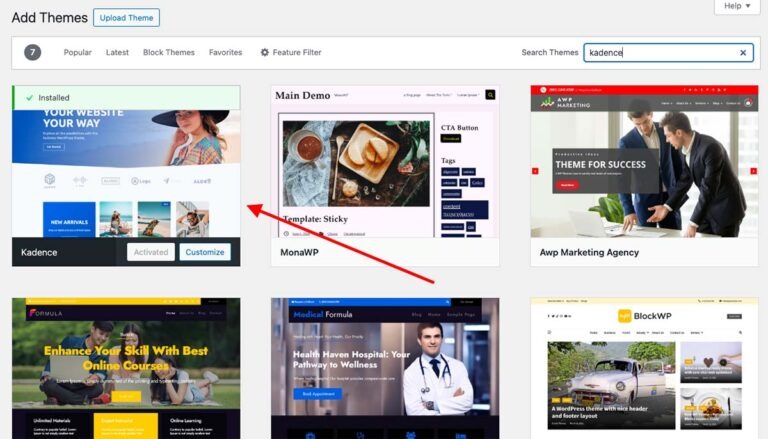
Installing Kadence was surprisingly painless. You just need to install it from the WordPress Theme Repository, activate it, and you’re ready to go.
Right after activation, Kadence shows a setup wizard — a step-by-step guide that helps you install demo templates, recommended plugins, and design presets.
In less than 5 minutes, I had a fully working website.
Compared to other multipurpose themes I’ve tested (looking at you, OceanWP), Kadence feels light — no cluttered dashboard, no confusing pop-ups. Everything is neatly organized.
Customization — Intuitive and Visual

This is where Kadence really shines.
The Customizer experience is one of the best I’ve seen in a free theme. Every change — font, color, header layout — updates instantly in real time.
Here’s what I found impressive:
Even with zero coding skills, you can make a professional, brand-consistent design in under an hour.
The live preview is snappy, too — I never had that annoying delay after hitting “Publish.”
Using Kadence Blocks — A Perfect Pair
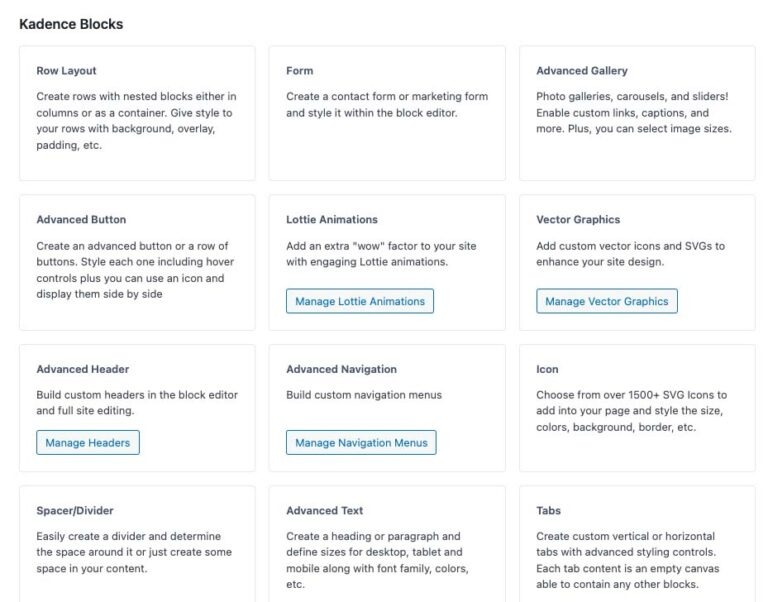
I also installed Kadence Blocks, their companion plugin for the block editor.
The integration was seamless. It added advanced blocks like info boxes, buttons, testimonials, accordions, and pricing tables directly in the Gutenberg editor — all matching the Kadence design system automatically.
This combo (Kadence Theme + Kadence Blocks) gives you the flexibility of a page builder like Elementor — but without the extra weight.
In fact, the design process felt smoother than using a traditional builder. Everything stayed inside Gutenberg, which made editing faster and cleaner.
Workflow Highlights
A few moments that stood out:
What Could Be Better
No theme is perfect, and Kadence isn’t an exception.
A few small quirks I noticed:
Nothing deal-breaking, but worth mentioning.
My Overall Experience
After spending an afternoon designing a blog layout with Kadence, one thing was clear — it just works.
No strange bugs, no heavy page reloads, no need for custom CSS. It strikes the perfect balance between simplicity and power — something that’s surprisingly hard to find.
If you’ve ever struggled with themes that look great in demos but fall apart when you edit them, Kadence will feel like a breath of fresh air.
Pros and Cons of Kadence Theme
Every theme has its bright spots and blind spots. Kadence isn’t any different.
After spending time testing it, here’s what really stood out — the good, the not-so-good, and a few surprises in between.
Pros: What Kadence Gets Right
Cons: Where Kadence Could Improve
Kadence nails the balance between simplicity and sophistication. It gives you pro-level control without feeling like a developer’s playground.
Yes, there are minor learning bumps and template limitations — but for most bloggers, freelancers, and small business owners, these are easy to overlook.
Comparison With Alternatives (Kadence vs Astra vs GeneratePress)
Kadence doesn’t live in a vacuum.
If you’re shopping for a fast, flexible WordPress theme, chances are you’re also looking at Astra and GeneratePress.
All three are lightweight, SEO-friendly, and popular — but they solve slightly different problems. Let’s break it down in plain English.
Quick Comparison
| Feature | Kadence | Astra | GeneratePress |
|---|---|---|---|
| Free version power | ⭐⭐⭐⭐☆ | ⭐⭐⭐☆☆ | ⭐⭐☆☆☆ |
| Customization (no code) | ⭐⭐⭐⭐⭐ | ⭐⭐⭐⭐☆ | ⭐⭐☆☆☆ |
| Gutenberg support | ⭐⭐⭐⭐⭐ | ⭐⭐⭐⭐☆ | ⭐⭐⭐☆☆ |
| Speed & performance | ⭐⭐⭐⭐⭐ | ⭐⭐⭐⭐☆ | ⭐⭐⭐⭐⭐ |
| Starter templates | ⭐⭐⭐☆☆ | ⭐⭐⭐⭐⭐ | ⭐⭐☆☆☆ |
| WooCommerce tools | ⭐⭐⭐⭐☆ | ⭐⭐⭐⭐☆ | ⭐⭐☆☆☆ |
| Beginner friendliness | ⭐⭐⭐⭐☆ | ⭐⭐⭐⭐☆ | ⭐⭐☆☆☆ |
Kadence vs Astra
Astra is popular for one big reason — it has a huge library of ready-made templates. You install Astra, import a demo site, swap the text and images, and you’re done. That works well if you don’t want to design much yourself.
Kadence takes a different approach.
Instead of giving you hundreds of templates, it gives you more design control inside WordPress itself — especially for headers, footers, layouts, and colors.
So the difference is simple:
If you like tweaking layouts, adding call-to-action buttons, and controlling your header and footer for conversions, Kadence feels more powerful.
Kadence vs GeneratePress
GeneratePress is the king of minimalism and speed.
It’s insanely lightweight — but it’s also very barebones unless you buy the premium add-ons.
Kadence, on the other hand, gives you:
…all in the free version.
So it comes down to this:
Kadence saves time. GeneratePress saves bytes.
Which One Should You Pick?
Here’s the easiest way to decide:
Pricing & Plans (Free vs Pro)
One of the best things about Kadence is that you don’t need to pull out your credit card just to get started.
The free version is genuinely useful — and for many websites, it’s all you’ll ever need.
But if you want advanced layouts, dynamic content, and deeper control, that’s where Kadence Pro comes in.
Let’s break it down.
Kadence Free — What You Get
The free Kadence Theme includes:
In other words, you get a fully usable, professional WordPress theme without paying anything.
It’s For:
…this is more than enough.
You can build a clean, fast, good-looking site and never feel like you’re using a “limited” theme.
Kadence Pro — What You Unlock
Kadence Pro is not about cosmetics — it adds real functionality.
Here’s what the Pro upgrade gives you:
These are the features that matter if you’re running:
Is Kadence Pro Worth It?
Here’s the honest answer:
If you just want a fast, nice-looking blog → Free version is enough.
If you want to optimize for conversions, layouts, and growth → Pro is worth it.
Kadence Pro isn’t something you need on day one.
It’s something you upgrade to once your site starts growing.
That’s how good pricing should work.
Final Verdict – Should You Use Kadence?
After testing Kadence, building real pages with it, and comparing it against Astra and GeneratePress, one thing is clear:
Kadence is one of the smartest WordPress theme choices right now.
It doesn’t try to be flashy.
It doesn’t overload you with useless features.
It simply gives you the tools you need to build a fast, flexible, modern website — and gets out of your way.
That’s exactly what most bloggers, creators, and small business owners want.
Why Kadence Works So Well
Kadence nails three things that most themes struggle to balance:
You don’t need Elementor.
You don’t need custom CSS.
You don’t need to upgrade on day one.
You just install Kadence, pick a starter template, and build.
Who I Recommend It For
If you are:
…Kadence is an excellent fit.
It gives you control without complexity, speed without sacrifice, and flexibility without bloat.
The Bottom Line
If you want a WordPress theme that loads fast, looks professional, works beautifully with Gutenberg, and doesn’t fight you every time you try to customize something, Kadence is absolutely worth using. It’s not just another theme you install and forget — it’s a solid foundation for building a website that can grow with you over time.